
Blackboard

VLE Roadshow logo

The VLE Roadshow: A Sneak Peek at our Future VLE

Last Thursday, the Technology-Enhanced Learning (TEL) Unit hosted an exciting and informal drop-in event at St John’s reception. The event aimed to showcase the new Virtual Learning Environment (VLE), Learn Ultra, and the area buzzed with excitement as staff gathered to see the new VLE in action!

The event spanned three hours, during which the TEL team welcomed numerous staff members who stopped by to say hello, engaged in casual conversations, and sought answers to their burning questions about the upcoming changes. It was great to witness the genuine interest and eagerness among the staff to learn more about the new VLE.

Images of staff visiting VLE Roadshow

The Roadshow was an opportunity for staff to connect with the TEL team, who were able to provide insights into the exciting features of the VLE. Attendees were encouraged to ask questions, enquire about training programmes, and delve into the specifics of how the new VLE will enhance their teaching and learning experiences.

The VLE Roadshow turned out to be a resounding success, with positive feedback from the staff who attended. Two more roadshows are planned for the coming weeks. This ensures that anyone who missed the chance to attend last week’s event, will have another opportunity to explore the new VLE.

Details of the next two VLE Roadshows:

Thursday 29th February 11am – 2pm, St John’s Campus, Reception.

Thursday 14th March 11am – 2pm, City Campus, Reception.

These are informal drop-in sessions, pop by at any point!

VLE Roadshow Logo 'Come and see your new VLE in action! Explore the new features and upgrades of our Virtual Learning Environment. Don't miss out on this interactive event. #VLERoadshow

The VLE Roadshow: A Sneak Peek at our Future VLE Read More »
VLE Roadshow – Come and see your new VLE!

The VLE review is well underway, with the first pilot courses using Anthology Ultra with their students. So far, student feedback has been excellent, with all preferring the new system. We also had an overwhelming response to our online briefing sessions, which were oversubscribed.

We’re sure that many of you are champing at the bit to take a look at the new VLE, so we at the Technology Enhanced Learning Unit will be running a VLE roadshow in the main reception foyer on Thursday 22nd February, from 11am until 2pm to demonstrate how Ultra works and how to get the best from it. Feel free to come along and ask questions or simply watch our demonstrations.

We will of course be providing full training in the coming months.

We look forward to seeing you there!

The Technology Enhanced Learning Unit

VLE Roadshow – Come and see your new VLE! Read More »

Blackboard Student Preview Mode

Photo by ©Alex

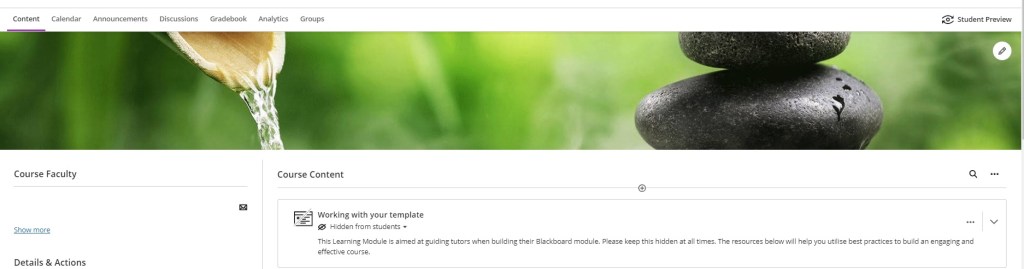
The ‘Student Preview’ feature within Blackboard is a useful tool to use as a lecturer. You can check that your course is ready for your students to access, whenever you make changes to your module content. Student Preview allows you to be certain that your course design meets expectations. The mode permits you to review whether the features you have created are accessible, easy to navigate and well thought out.

When is student preview most useful?

A range of Blackboard actions and functions can be viewed and used, when in Student Preview mode. Please see some examples below:

  • Ensuring that ‘hidden’ or ‘release by date’ menu links, files or folders have been deployed appropriately.
  • To take a Blackboard test or survey you have created.
  • Submitting assignments.
  • To check all links work for students.

How does Student Preview work?

By clicking on the eye-like icon, towards the top right-hand corner of your module, you can enter Student Preview mode. A bar will appear across the top of your page, to signal that ‘Student Preview mode is ON’.

Eye-like icon for Student Preview Mode

You will have a student preview user account created, which you can temporarily use to interact with your module. It is important that when you have completed viewing your module as a student, that you exit this mode. We recommend the option to ‘Delete the preview user and all data’. Please see further instructions in the following link:

https://lttu.uk/support/Blackboard/UltraManual/student-preview

If you are interested in learning more about the Student Preview mode, please see a link below to the Blackboard help pages:

Student Preview

Blackboard Student Preview Mode Read More »

Flat vector people using video in online learning meeting conference and working concept By apinan

Anthology Ultra VLE

Photo: by © apinan

The implementation of the new VLE Anthology Ultra is now well underway, and the TEL team have started working with a number of early adopters to prepare their Ultra modules, ready for teaching in semester 2. We also have a group of users who have expressed an interest in learning more about the new system early on in the project. The TEL Unit will be gathering feedback from all the early adopters, which will be used to inform the full rollout to all staff over the coming months.

We will be running briefing sessions for anyone wishing to find out more, on 2nd  February 2024 1-2pm and 5th February 2024 12-1pm.  Members of the TEL team have also arranged to attend a number of departmental and school meetings, to provide further updates and to provide an opportunity for questions and answers. If you would like to join either of the open briefing sessions, you can sign up from the Staff Development Booking system Staff Development Workshops – University of Worcester

The new Ultra environment is significantly different from our current version, with a more modern look and feel, new features and functionality. We strongly encourage all teaching staff to engage in training to make the most of the enhanced opportunities, and to set aside some time to prepare your modules for the next academic year – the training will enable you to assess how much time you should allow. Training sessions will be organised for all Schools, so please look out for workshops and other opportunities to get involved. If you have any away days or events organised where you would like a briefing for your team, please get in touch, and a member of TEL would be happy to attend to answer any questions you may have. Please contact Libby Symonds, e.symonds@worc.ac.uk, if you would like any further information, or to organise a session for your team.

Anthology Ultra VLE Read More »

Cookies and computer keyboard. 'Cookie' © By poko42

Important Changes to Chrome

Photo: ‘Cookie’ © By poko42

New Chrome changes and your use of online systems, including Blackboard VLE.

We recommend using Chrome or Mozilla Firefox browsers, when using the Blackboard VLE. However, you may be aware that Google Chrome have started testing a new feature, with the intention of protecting users from third-party cookie tracking. This will result in all third-party cookies being disabled, as a default setting. Initially a selection of Chrome users will be notified, but the intention is that all users will experience this change by the end of 2024.

Why you still need your Third-Party Cookies for the Blackboard VLE.

Third-party cookies are often used as an essential element for the functionality of different websites. Within Blackboard there are several integrated tools which require third-party cookies to be enabled. If you experience any issues with the Blackboard VLE, such as pages not loading correctly, even after a refresh – you may need to alter your third-party cookie settings.

How to change your settings:

  • Users who have been selected by Google Chrome, will have a notification, when they open their Chrome browser. If you are viewing the initial notification, it is possible at this stage, to click on the cog, to select and confirm your account third-party cookie choices.
  • Chrome users will be able to tell whether any cookies are active on a webpage, by looking for the ‘eye icon’ within the address bar, in the top right of the Chrome browser. If third-party cookies have been blocked, there will be a line through the eye. A click on the eye icon, will permit users to select and choose whether they wish to have third-party cookies enabled.
  • Alternatively, you can alter your Chrome account settings, as a whole, by selecting the three dots, in the top right-hand corner of the browser. A menu will appear, where you can select ‘Settings’ → ‘Privacy and Security’ from the left-hand side-bar menu, → then ‘Cookies and other site data’ to view all the possible cookie settings for your account.

To find out more, you make wish to read Google Chrome’s recent blog post:

https://blog.google/products/chrome/privacy-sandbox-tracking-protection/

Important Changes to Chrome Read More »

Scene of Worcester City

Happy 2024!

The Technology Enhanced Learning Unit would like to wish everyone a Happy New Year. We look forward to working with you this semester.

If you have recently joined as a member of Academic staff, as part of your induction, you can sign up for the forthcoming staff development workshops:

  • Induction Programme: Working with Library Services and TEL to enhance teaching and learning. – on the 18th January, between 10:00 – 11:00 a.m.
  • Introduction to Blackboard for new staff. – on the 26th January, between 10:15 – 11.45 a.m.

The TEL unit sits within the broader Library Services Department. You can find out more about the TEL unit by visiting our webpages, https://uwtel.co.uk/. Within these sessions, you will have the opportunity to be introduced to the learning technologies, which are used to enrich teaching and learning at the University of Worcester. Please visit the Staff development workshops, from the staff homepage, to view the full workshop details and to book your place.

With January underway, behind the scenes, Academic staff and Learning Technologists have already been busily working on the pilot project for our new VLE. We will soon be updating our VLE page with news and events. Remember, if you have any questions regarding the implementation of Anthology’s Blackboard Learn Ultra, you can visit our designated webpage, https://uwtel.co.uk/vle-review-new-virtual-learning-environment/

Please get in touch with us, here at the TEL team, for any training or support needs you may require this semester. We are available for tutorials, workshops, or departmental briefings to suit your needs. These can be arranged by contacting tel@worc.ac.uk in the first instance.

We eagerly await you making use of the services available from the TEL team this year.

Happy 2024! Read More »

Managing Turnitin Submissions

Turnitin is our most frequently used system for assessment and is where students can submit their text-based assignments, such as, essays, reports, and presentations.

With various assessment deadlines occurring in the coming days and weeks, you may wish to refamiliarise yourself with our guide to Turnitin, and submission points within Blackboard:

https://lttu.uk/support/Turnitin/Guide/index.html

Useful points to remember:

  • Students can resubmit work to the submission point as many times as they like, until the due date.
  • After the 3rd upload, there will be a delay of 24 hours until the similarity report is received.
  • Once the due date has passed, students will be unable to resubmit again. However, if they have not made a submission until after the due date, this will appear as a late submission, highlighted in red. (We recommend using ‘allow late submissions’ as a setting.)
  • Resubmissions, resits and mitigating circumstances, will require a new Turnitin submission point to be created.
  • Before you begin grading, you will need to hide the Blackboard ‘Grade Center’ column from students – otherwise they will be able to access their grades as soon as they have been entered. (Instructions can be found in ‘Part 1’ of the Turnitin guide, linked above.)
  • Grades and feedback are automatically released to students on the ‘Feedback Release Date’ and ‘Time’, through Turnitin.
  • You may wish to share relevant student support sources, in the run up to submissions: https://uwtel.co.uk/support-resources/#studentresources

If you have any queries, feel free to contact the TEL team at: tel@worc.ac.uk

Managing Turnitin Submissions Read More »

New Virtual Learning Environment

After a thorough and robust procurement exercise, we are pleased to announce that our new Virtual Learning Environment will be Anthology’s Blackboard Learn Ultra.

This is a new version of Blackboard and provides a modern, intuitive course environment for both staff and students. The course areas are very different from our current version of Blackboard and we will be working closely with course teams over the course of the coming year to provide training and promote best practice in the use of Ultra.

The project team will be working hard over the coming months to get the new environment set up and running with all the associated integrations ready for training to start in the new year.

It is anticipated that all courses and modules will be delivered on the new system from the 24/25 academic year. In the meantime, we are looking for volunteers as early adopters for Ultra from Semester 2 23/24.

If your course is starting in semester 2 or you have a stand alone course or module running anytime from January 2024 please get in touch and we can discuss the possibility of being an early adopter. If you course has already started, we recommend staying on the current system until the new academic year to avoid any confusion for students.

We will be issuing regular updates to keep staff informed of progress and there will be a dedicated page on our website with more information and frequently asked questions. In the meantime, if you require any further information or have any questions about the project please contact Libby Symonds, Head of the Technology Enhanced Learning Unit e.symonds@worc.ac.uk.

New Virtual Learning Environment Read More »

A man with long red hair, dressed in armour, points a sword at the camera, with a woodland backdrop behind him

September is Coming!

We bring dire news form the North! Winter (or September at least) is coming! Do you have everything in place, ready for the Wildlings your students to arrive? Here is our checklist to help you survive prepare.

Have you enrolled on your modules?

As has been the case for the last few years, you will need to enrol on your modules via the Blackboard 2022-23 form, which you will find on the staff portal after signing in. Please allow 24 hours for your request to be actioned. Please note that course leaders also need to complete this step. If you are no longer a course lead but are still receiving enrolment notification emails you will need to let Registry know so that SITS can be updated.

There is also a Blackboard Access 2021-22 form still live on the staff portal. If you are taking over a module this year, it may be useful to enrol on last year’s module.

Have you transferred your content?

As ever, modules will be empty and you may want to transfer content from the 21-22 instance of the module. Do not transfer the Assessment page as assignments need to be set up afresh each year. Migrating assignments can cause serious problems in the grade centre of the new module, so it really is best avoided.

Instructions for transferring content can be found here.

Sharpen your skills

We run a range of courses designed to help you get the most out of Blackboard. These are published on the Staff Development Workshop page and will be advertised via our Twitter, blog and the staff newsletter.

If you require one-to-one training on a specific area of Blackboard, email us with details at TEL@worc.ac.uk

September is Coming! Read More »

Clapper board

Blackboard Rollover 22-23

Blackboard modules for the 22-23 academic year are now available and ready for you to start working on.

As in previous years you will need to re-register for access to the new modules (even if you are the module leader) from the staff web pages – instructions can be found here:
https://lttu.uk/support/Blackboard/Manual/accessing-new-courses.html

You may want to consider migrating content from last year’s modules. If you do this, it is very important that you do not roll over the assessment tab or any of the assessments within, as this will cause problems within your grade centre. If you roll over any tests or quizzes please note that these will not be automatically deployed, so you will need to insert them into the appropriate area within your module.

Whilst consistency is an important factor, we recognise that all modules are individual and you may want to look at some of the other tools and functionality available in Blackboard – we have a full online Blackboard guide but if you need any further support from the TEL team, or would like us to provide an advisory review of your online learning resources, please contact TEL@worc.ac.uk to arrange a session with an Academic Learning Technologist.

Blackboard Rollover 22-23 Read More »