
You may be aware that conversations are currently ongoing about the future of Blackboard Class Collaborate and the move to Microsoft Teams for online teaching. While no final decisions have yet been confirmed, now is a good time to ensure that any Class Collaborate recordings you wish to keep are safely stored elsewhere.
To help safeguard your teaching materials, we strongly recommend downloading your Blackboard Class Collaborate recordings and uploading them to Panopto for future use. This blog post outlines the steps involved in the process.
What you will need
Before you begin, please ensure you have access to the following:
- The Blackboard Class Collaborate session recordings that you wish to retain
- A Panopto link added to your Blackboard module
- Sufficient space on your computer to download and temporarily store the recorded files
If the Panopto LTI link is not already present in your Blackboard module, you will need to add this before uploading your recordings, which can be added through the content market.
Step 1: Download your Blackboard Class Collaborate recording
- Log in to Blackboard and open the relevant module.
- Click the three dots (⋮) next to Class Collaborate and select ‘view all recordings’.

- Locate the recording you want to save.
- Click the three dots (⋮) next to the recording and choose ‘Download’.
- The recording will download as an MP4 file to your computer.

Step 2: Upload the recording to Panopto
- Click on the Panopto website link within your Blackboard module.

- Navigate to or create a folder for the module’s recordings. You can use your existing module folder if this is already set up.
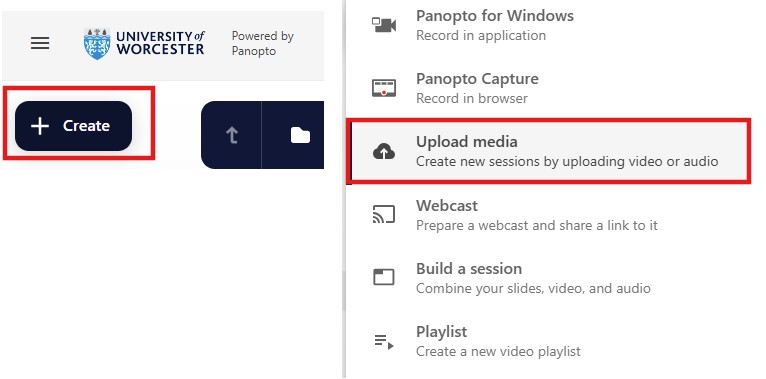
- Select Create > Upload media:
- Drag and drop the downloaded MP4 file or browse to select it.
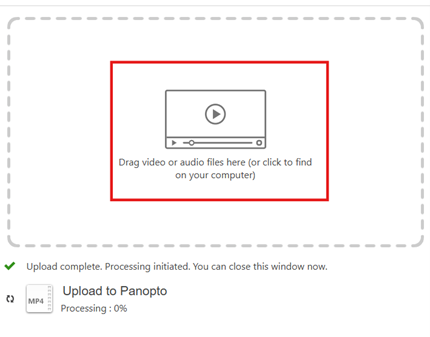
- Wait for the file to upload and finish processing.
After your recording appears in Panopto, you may want to check playback to ensure the audio and video are correct.
Your recording will now be available in Panopto for students on the module to view.
We recommend completing this process before August, particularly for any recordings you may need again in the future. Once the future of Class Collaborate and Teams has been approved, we will communicate the outcome.
Need help or want someone to walk you through it?
If you would like support with downloading or uploading recordings, or advice on managing your Panopto content, please contact TEL@worc.ac.uk or book a 20 minutes with TEL appointment via MS bookings.
