TEL Support

Final checks of PebblePad Resources and Workspace settings

For those of you who are about to deploy PebblePad resources to your students for assessment, now is a good time to ensure that the resource and workspace settings are up to date.

  1. Check that your PebblePad workbook or portfolio template is current.
  • Have you changed the name of the resource to reflect the current academic year (if appropriate)?
  • Have you checked that all links still work inside your workbook  / portfolio template?
  1. When the TEL team create a PebblePad workspace for you, we place a PebblePad icon within your Blackboard module to control PebblePad student enrolments.
  • This is set by default to be ‘Hidden from students’. If you would like your students to be able to access PebblePad from within your Blackboard course, set the PebblePad icon to ‘Visible to students’.
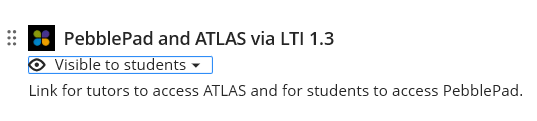
Image of 'PebblePad and ATLAS via LTI 1.3' Icon to be taken to PebblePad from Blackboard.
  1. Have you entered a due date and time into the submission deadline and revision deadline on the workspace, or are you planning on manually ‘pausing’ your assessment?
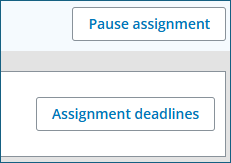
'Pause assignment' button is shown at the top, with the 'Assignment deadlines' button shown below, as they appear in PebblePad.
  • Remember to set a reminder in your diary if you have decided to manually ‘Pause’ the assessment.
  • Individual student extensions for PebblePad assessments can be added where required. If you think you may need to add an assessment extension, then you must use an assessment deadline when setting up your assignment.
  1. If you have students who inform you that they do not have access to PebblePad, then you (as tutors) can click on the PebblePad icon in Blackboard to update your PebblePad student enrolments (see point 2, above). This will automatically add any students who have registered late.
  1. If you are taking a class session and instructing your students in the use of PebblePad, it is a good idea to advise students to ‘Favourite’ their work. This will ensure that it is always easy for them to locate.
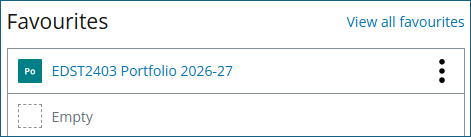
Image of an example of 'Favourites', as they appear in Pebble+

    If you have any questions about any of the above settings or features of PebblePad then please contact a Learning Technologist who will be happy to guide you through the process.

    Final checks of PebblePad Resources and Workspace settings Read More »

    Browser Support for the Blackboard VLE

    With the new academic year underway, we wished to provide new browser guidance to help both staff and students experience the full functionality of the Blackboard VLE.

    Chrome is our recommended browser for the Blackboard VLE

    The main browser we recommend for the Blackboard VLE is Google Chrome.

    Staff and students need to be aware that Safari, Internet Explorer, or Brave are NOT supported.

    Enable Third-Party Cookies for the VLE

    Within Blackboard there are several integrated tools which require third-party cookies to be allowed. These include, Panopto, Turnitin and PebblePad.

    Chrome have guidance about how to allow third-party cookies for a specific site.

    An Alternative if you have any issues

    • We now recommend Microsoft Edge (MS Edge) as the preferred alternative browser.

    Previously, Mozilla Firefox was recommended but due to recent updates, some integrations within the VLE may not function as expected when accessed through Firefox.

    • A ‘New Incognito window’ in Chrome can also be used as an alternative option.

    Troubleshooting tips:

    If you have any issues, such as pages or integrations not loading, even after a page refresh – there are troubleshooting steps you can take:

    • Log out of Blackboard and try clearing the cache on your browser (Ctrl+Shift+Del keys – you may wish to unselect clearing any saved passwords). Then log back into MyDay (MyWorcester), then Blackboard.
    • Or try opening a ‘New Incognito window’ in Chrome and log into MyDay, then Blackboard using this window instead.
    • Or try logging in using an alternative browser instead – MS Edge.
    • Ensure you have allowed third-party cookies for the VLE website https://worcesterbb.blackboard.com
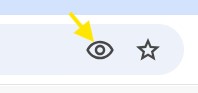
    • Check the Chrome ‘Eye’ is visible when you are within the VLE or when using integrations, like Turnitin. This means third-party cookies are enabled.
    Third-party cookies eye icon, with cookies enabled in Chrome browser.

    (The eye icon is located in the top right-hand side of the Chrome address bar.)

    Eye icon with a line through it. Meaning third-party cookies are blocked for a website.

    If you can see a line through the eye icon, click on this to alter your cookie settings for the page:

    If you continue to experience any problems, please feel free to contact TEL for support with the Blackboard VLE TEL@worc.ac.uk.

    Summary:

    • Chrome is the recommended browser for the Blackboard VLE (or MS Edge as an alternative choice). 
    • Safari, Internet Explorer, or Brave are NOT supported.
    • Add the Blackboard VLE address in your browser settings as a website ‘exception’ to allow third-party cookies for the site: https://worcesterbb.blackboard.com (Integrated tools require third-party cookies to be enabled for the VLE. These include Panopto, Turnitin and PebblePad.)
    • The Blackboard browser checker can help you confirm that your settings are correct.
    • Contact TEL for support with Blackboard specifically TEL@worc.ac.uk. Digital Services can also help with browser troubleshooting.

    Browser Support for the Blackboard VLE Read More »

    Getting ready for the New Academic Year

    As we prepare to welcome students for the new academic year, now is the perfect time to make sure your digital learning spaces are ready. Taking a few minutes to review your Blackboard modules, PebblePad resources, and online learning tools can help ensure a smooth start to teaching.

    1. Check what students can see when they access your Blackboard module

    When students access your Blackboard module for the first time, they should be able to find key information quickly and easily.

    Before teaching begins, it is beneficial to use ‘Student Preview’ to check what content is visible to your students. If you have been developing content over the summer, check that everything students need for the first few weeks has been made visible.

    If you need to update the visibility of multiple documents and/or learning modules, you can use the ‘batch edit’ option to select all of the content you want to make visible.

    1. Check any links are working

    Over the summer, resources can move, files may be updated, and links can change.

    Before teaching begins:

    • Open key documents and presentations
    • Test external website links
    • Ensure embedded media still works
    1. Ensure PebblePad Resources and Workspaces are requested

    If you use PebblePad as part of your module, please ensure you have requested a new resource for the upcoming academic year and for the workspace to be set up by the TEL unit, if you have not done so already.

    It is particularly important to let us know if there are changes needed to your PebblePad resource, before it is made available to students.

    At this time of year, enquiries can be high, so giving as much notice as possible is appreciated. Getting this done early means your students will have access to their PebblePad resource when they need it.

    1. Make sure you are familiar with Microsoft Teams for online sessions

    From this academic year, online teaching sessions will take place through Microsoft Teams. If you are unfamiliar with Teams or would like a refresher, take a look at our previous blog post containing useful guidance videos. For additional support or training, please contact Digital Services.

    1. Reminders for student inductions
    • As part of your student’s induction week, ensure you check that students have access to their Blackboard modules. If they do not, it may be because they have not yet completed their registration. Information for students is available through our ‘Student Blackboard Ultra FAQs’ webpage.
    • You may also choose to share suitable links from our student support pages with your students.
    • Please also point out the ‘Alternative formats’ available to students on Blackboard, to support them with using your Blackboard pages. Information for students is available via our new Blackboard Ally guide for students.
    1. Plan your first Blackboard announcement

    Announcements are a great way to establish communication with students and can be scheduled in advance.

    Consider scheduling a message which:

    • Welcomes students to the module
    • Highlights where key information can be found
    • Explains expectations for the first week
    • Encourages students to get in touch if they have questions

    Taking a little time now can make the start of the academic year smoother, clearer, and more welcoming for both staff and students.

    Need support? The Technology Enhanced Learning (TEL) unit is here to help with Blackboard, PebblePad and digital learning tools more broadly. Get in touch if you need any advice before teaching begins. TEL@worc.ac.uk

    Getting ready for the New Academic Year Read More »

    Get Ready for Digital Accessibility Week

    As we approach our first Digital Accessibility Week (1st – 5th June 2026), it is a great time to review the current accessibility of your digital learning resources. This is particularly important as you prepare to migrate your Blackboard module content for Semester 1. Reviewing your materials now can help you identify and address accessibility issues early.

    How to check the accessibility of learning resources?

    Blackboard Ally is a valuable tool for identifying accessibility issues within your content and providing guidance on how to improve it.

    Many of the issues highlighted by Blackboard Ally can be resolved quickly. Our 5-minute fixes resource offers practical guidance on addressing commonly identified accessibility issues in documents using Blackboard Ally.

    Top tips for digital accessibility

    The TEL website provides further guidance and resources to support with improving the accessibility of documents and resources. Some key aspects to consider are:

    • Adding alternative (alt) text to images
    • Using high colour contrast to ensure text stands out from the background
    • Structuring content clearly using headings and sections
    • Keeping slides or documents easy to read by limiting text and using clear, readable font sizes
    • Using meaningful link text and file names to support navigation

    Further support

    For more information about the events throughout digital accessibility week, including TEL drop-in sessions, please see the website link below:

    Digital Accessibility Week Website

    Need help? Contact us at TEL@worc.ac.uk or book a 20 minutes with TEL appointment via our Microsoft bookings page.

    Get Ready for Digital Accessibility Week Read More »

    TEL Support for Module Rollover 2026

    Laptop and graphics showing a map of ideas.

    Part 2 of 2

    Module Rollover for Semester 1 will occur week commencing the 8th June.

    In anticipation of the upcoming module rollover date, we would like to let you know that the TEL team are here to help with any queries you may have. Our Learning Technologists are available to discuss how to get the best out of the university’s technological tools, to enhance your pedagogic approaches.

    Departmental or Course teams are welcome to contact us at TEL tel@worc.ac.uk to arrange a meeting.

    Online support available from TEL

    Module Design support

    Our Learning Technologists have developed some insightful Module Design guidance for staff:

    If you would like to speak with TEL about module design, please contact us at tel@worc.ac.uk

    The Digital Education Hub

    The Digital Education Hub is a new SharePoint site with practical guidance and support for online or blended learning. You can find out more about how the hub can be used here.

    The Blackboard Manual

    Our Blackboard Learn Ultra Manual covers everything from creating new content and setting up assessments, to using interactive tools or features which boost student engagement.

    Other support from TEL

    If you’d like any extra support, please don’t hesitate to contact the TEL Unit at tel@worc.ac.uk or by using the booking form for a ‘20 Mins with TEL’ slot with a Learning Technologist.

    TEL Support for Module Rollover 2026 Read More »

    New SharePoint site to support the Design and Delivery of Online and Blended Learning

    Modern science or technology abstract background. Cyberspace surface illustration. Vector.

    Introducing the Digital Education Hub

    The Digital Education Hub is a new SharePoint site created to support colleagues in the design and delivery of online and blended learning.

    The Hub brings together practical and technology-enhanced guidance, with examples and resources all in one place – making it easy to access support. It can be used when designing a new course or CPD programme, developing online activities, refreshing existing content, or for exploring different approaches to teaching and learning.

    You’ll find step-by-step guidance, templates, examples of practice, and support for using digital tools or platforms at the point of need. The Hub is intended to support colleagues involved in teaching and course development, regardless of experience level.

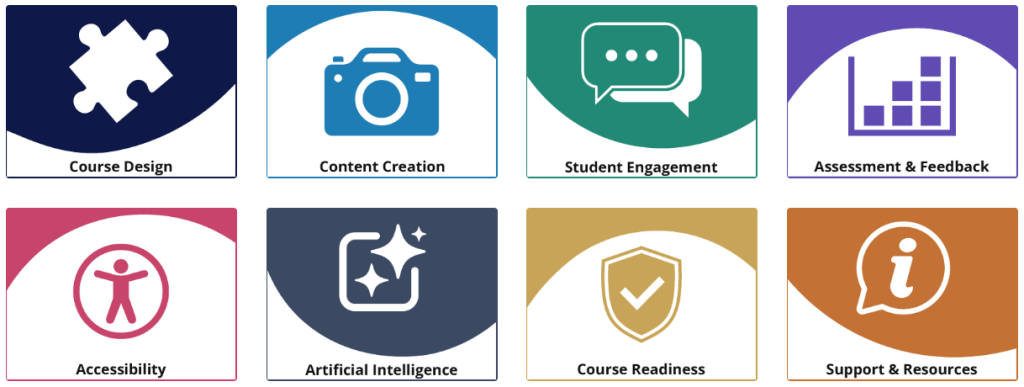
    Menu / Sections: Course Design, Content Creation, Student Engagement, Assessment & Feedback, Accessibility, Artificial Intelligence, Course Readiness, Support & Resources

    What you’ll find in the Hub

    The Hub is structured around key aspects of digital education. It includes guidance on planning and structuring courses, creating engaging content, and encouraging student participation in both asynchronous and live settings. You’ll find advice for designing assessment and feedback, and for making content accessible and inclusive. There is also guidance on course readiness to support reviewing and sense-checking courses before launch, alongside templates, tools and further support.

    How to use the Hub

    You can use the Hub in a way that suits your needs:

    • Work through sections step-by-step when designing a new course
    • Dip into specific topics for quick guidance
    • Use templates and checklists to support planning and review
    • Revisit sections as part of ongoing course development

    The Hub focuses on small, actionable guidance to assist colleagues in designing clear, consistent and well-structured online and blended learning. This includes aligning learning outcomes, activities and assessment, making effective use of digital tools, and ensuring content is accessible and easy to navigate.

    The Hub’s guidance is intended to be practical and flexible – you don’t need to use everything, just what’s most helpful for your context.

    Explore the Hub

    Visit the Digital Education Hub (SharePoint site, UW login required).

    We recommend adding the site to your
    favourites or following it in SharePoint so it’s easy to find again and remains visible in your navigation.

    Gif showing how to select 'Following' in SharePoint

    While the Hub provides an on-demand resource, the TEL team are also here to offer one-to-one assistance where needed. If you’d like to talk through your course or project, or explore how the Hub can support your teaching, please feel free to get in touch: tel@worc.ac.uk

    New SharePoint site to support the Design and Delivery of Online and Blended Learning Read More »

    Introducing the TEL Chatbot: a quicker way for students to get answers

    We know that many student queries sent to academic staff relate to learning technologies rather than module content – things like accessing tools, submitting work, or understanding how a platform works. To help streamline this, the TEL team has launched a new TEL Chatbot, designed to give students fast, reliable answers to common questions. 

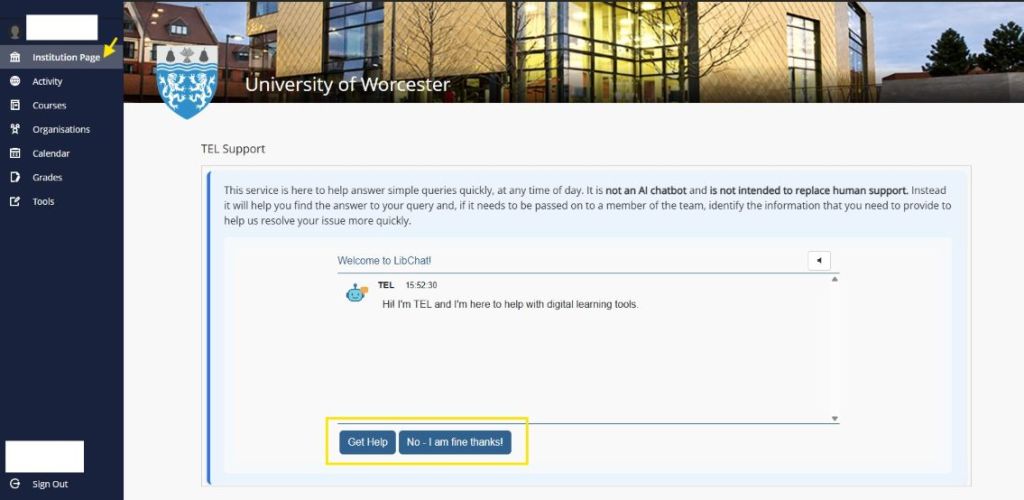
    The chatbot is not AI-driven and doesn’t generate responses. Instead, it draws on a curated set of frequently asked questions and approved guidance from the TEL team, ensuring that students receive clear, accurate and consistent information. It’s available 24/7 and acts as a helpful first point of contact for common TEL-related queries. 

    You’ll find the TEL Chatbot on the institution page in Blackboard, making it easy for students to access whenever they’re working online. 

    How this helps you 
    • Reduces repeat queries landing in your inbox 
    • Gives students immediate answers to common TEL questions 
    • Ensures advice is accurate and up to date 
    • Frees up time for more complex or academic-focused support 
    What we’re asking of you 

    When students contact you with questions about learning technologies, we’d really appreciate it if you could direct them to the TEL Chatbot in the first instance. It’s designed to handle the most common issues and will point students to the TEL team where further support is needed. 

    You might also want to: 

    • Mention the chatbot in Blackboard announcements 
    • Highlight it during early teaching sessions 
    • Add a brief note to module information or FAQs 

    The TEL Chatbot won’t replace human support – but we hope it will become a reliable first stop.  

    Introducing the TEL Chatbot: a quicker way for students to get answers Read More »