
With both staff and students accessing Blackboard every day, we thought it would be useful to share some handy hints and tips about managing announcements, module (course) lists and profiles in Blackboard.
Profile and Activity Stream
We have a useful informative video for students about customising Blackboard, with an overview of the main profile and activity stream settings which can be applied:
Please see a link to the video below which can be shared with your students if you wish:
Blackboard also provides an overview of the Activity Stream for users here: Activity Stream – Blackboard
Module Lists
How to select favourites
If your students are finding it tricky to find a module they need due to similar module titles / codes, or if they have more than one occurrence visible on their dashboard, they can favourite modules by selecting the star icon:

The favourites star brings the module to the top of their list, which is useful when assignments are due, and students need to locate the correct module quickly. This reduces the chance of a student accidentally submitting to an incorrect assignment submission point in another module occurrence.
Finding Missing or Hidden modules
You can use the search bar and filters on your ‘Courses’ page to find modules. If you discover that a module is missing as a staff member, you can enrol again using the Blackboard Access forms. Your access will then be granted within an hour and, as a staff member, it is possible to use the list at the bottom of the form to remove your own access too – so that you can hop on and off modules as necessary when supporting colleagues.
However, sometimes users inadvertently hide a module from their list in Blackboard. If this has happened, you will see the ‘Hidden from me’ option in the filter choices.
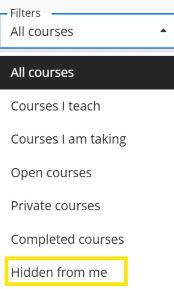
You can reveal the hidden module so it appears again in your list by using the three dots in the corner of the module tile → ‘Show Course’.

Announcements
Blackboard has the following guidance for instructors about announcements:
Creating announcements in Blackboard Ultra
It is possible to save drafts of announcements ahead of when you need to send them, or to schedule announcements so that they are delivered to your students on a particular date and time.
Blackboard also has a student-orientated announcements help page, which you may find useful: How students view announcements
Reports of unwanted Email Announcements:
If any of your students have changed course or have completed earlier undergraduate study but are still receiving email notifications, these are most likely to be coming from a Blackboard organisation page. We can remove staff or students’ enrolments from any historic organisation pages. The unwanted messages will then stop clogging up inboxes.
Staff or students can contact us at tel@worc.ac.uk, to inform us about any announcement issues.
