

Blackboard instructors now have access to a new AI Conversation tool that supports both ‘Socratic Questioning’ and ‘Role-play’ scenarios. This feature allows students to interact with an AI persona to explore ideas, ask questions, and practise responding to realistic situations.
In Socratic questioning mode, students can ask questions about a specific topic and build their understanding through guided interaction.
Students can also take part in a simulated scenario with an AI-generated character using the Role-play tool. This can be particularly useful for practising professional conversations, decision-making, or problem-solving in a safe environment.
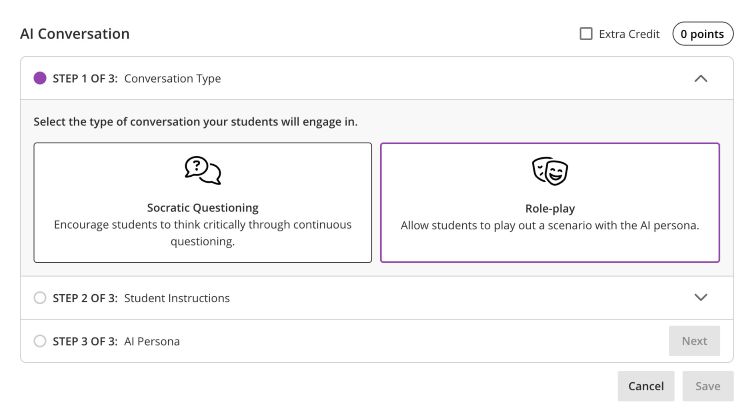
Setting up a Role-play conversation
Creating a role-play activity involves two main stages.
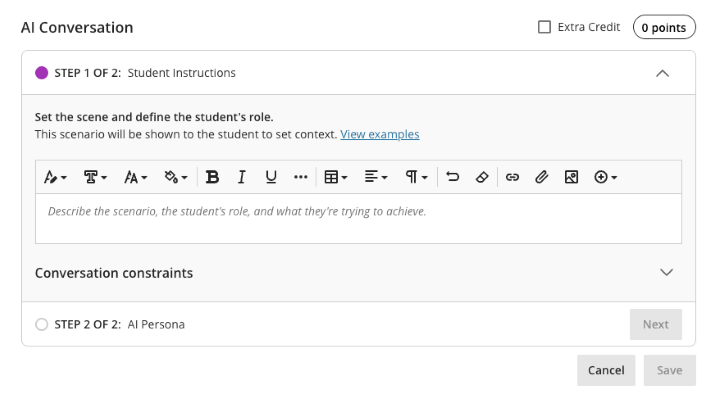
1. Set the scene and define the student’s role
- Describe the scenario
- Explain the context
- Define what the student is trying to achieve
2. Create the AI persona
- Upload a profile image for the AI ‘character’
- Give them a name
- Define their personality and behaviour
- Provide instructions for how they should respond
- Set the complexity of the responses they will give
Automatic setup
You can also automatically generate a conversation scenario using documents uploaded to the system. The tool can use a range of file types, including PDF, Word, PowerPoint, text, RTF, and HTML files, to help create a conversation based on existing course materials.
Testing
Before releasing the activity to students, you can preview the conversation yourself by interacting with the AI persona. This allows you to check that the responses behave as expected and refine the scenario if needed.
Reviewing Student Interactions
As an instructor, you can review AI conversation transcripts to see how students engaged with the scenario and how they approached the discussion.
Further Information
More details about setting up the Conversations tool can be found on the Blackboard AI Conversation support page.
AI Data Usage and Security
As an integrated feature within Blackboard, the AI Conversation tool does not use your course data to train or improve external AI models. More information about this can be found on Blackboard’s Trustworthy AI Support pages.