
Tests & Assignments in Ultra
In the Learn Ultra environment, assignments play an important role in facilitating student engagement and assessing their understanding of course material. Ultra Assignments primarily cater to a diverse range of tasks, from traditional written assignments such as essays, reports, and presentations to the submission of multimedia content like videos.
While Turnitin remains a popular choice for straightforward written submissions due to its similarity report and feedback tools, there are advantages to opting for an Ultra Assignment in certain scenarios:
-
Group Work: Ultra Assignments streamline group submissions, allowing a student to submit work on behalf of their group while ensuring all members can access feedback. This feature requires setting up groups within Ultra before creating the assignment, fostering collaborative learning experiences.
-
Multiple Files and File Types: Ultra Assignments accommodate multiple files of various formats. This flexibility is particularly beneficial for assignments involving diverse materials such as data files, media content, or appendices of varying formats.
-
Video Assignments with Panopto Integration: The built-in Panopto integration in Ultra Assignments simplifies the submission of video assignments, providing a seamless experience for both instructors and students.
By using Ultra Assignments, you can tailor your assessment strategies to align with the diverse needs and objectives of your courses, enhancing the learning experience for all participants.
Our online Blackboard Learn Ultra Manual contains further details about assessment recommendations and choices.
For full guidance when creating a Blackboard Learn Ultra Assignment, please see a link to our manual page here.
For an at a glance guide, please see below:
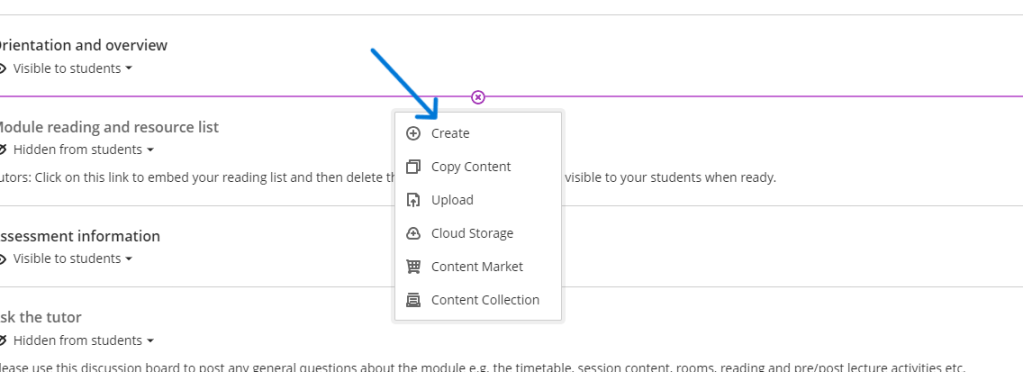
Click the PLUS icon in the location you would like to place the assignment:
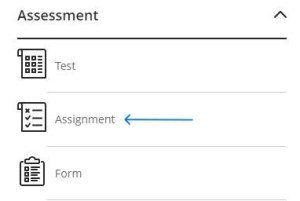
Select ‘Assignment’:
Give your assignment a meaningful name:

If it is an extension or resubmission remember to include this in the name. Use the plus icon to add assignment instructions as text, plus any supporting files, such as marking criteria or additional instructions
